
|
The world of non-commercial film and A-V |
Events Diary | Search | ||
| The Film and Video Institute |  Join us on Facebook
| ||||
Pages in Weebly The Navigation
article recommends keeping pages short.
|
|||||
Main and Child PagesThere does not seem to be a limit to the length of page you could produce, so be careful not to force readers to use the "page down" key more than a couple of times before they reach the end of any page. The Home Page should never be more than two "page downs". If any other Main Page includes material which
requires more space, keep the Main Page short but link
to a Sub-Menu or to Child Pages.
See it on our example websiteVisit http://midlands-movies.weebly.com, go to the Members Page to see an example of using Child Pages. |
Child Pages in Weebly ... Name it xyz-2 where xyz is the name of the Main Page on which the item begins. If you run to a third continuation call it xyz-3. |
||||
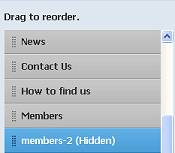 Drag the new page under
the relevant Main Page in the index list on the left,
then click the Save button. Drag the new page under
the relevant Main Page in the index list on the left,
then click the Save button.
|
|||||
| At the foot of the Main Page where the article or list
begins, type "continued on page two" or just "next".
Select those words and click the Create Link button on
the paragraph toolbar. At the "Your Pages" prompt ...
choose xyz-2 .
On each Child Page include links to
|
|||||
|
There are nine pages in this series of detailed Weebly tips: They support general articles on web design for film-making and AV club websites which begin here. [Weebly frequently update and improve their system. These pages are based on tests in March 2015.] |
|||||
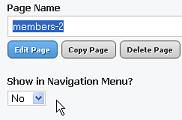 Click the Pages
Tab and create a new page, but at the "Show in
Navigation Menu?" prompt select "No". This stops
the Child Page appearing in the menu.
Click the Pages
Tab and create a new page, but at the "Show in
Navigation Menu?" prompt select "No". This stops
the Child Page appearing in the menu.
Share your passions.
Share your stories.

