IAC logo The world of non-commercial film and A-V Events Diary Search
The Film and Video Institute find us on facebook Join us on Facebook


Downloading Super© | Using Super© | Embedding | Upload process

Putting Your Video on the Web - Introduction

UPLOAD ... just do it !

If your movie is standard definition (4:3 or 16:9) and under 9 minutes long just ...

1

  • Go to www.youtube.com.
  • Click "sign up" and open a free account.
  • Click "upload" to go to the upload page.

2

  • Click "Upload Video" and point to the movie file on your computer.

3

  • As uploading starts edit the title and description details.
  • Wait several hours while it uploads ... but you only have to do that once!

4

  • When it is ready, click "Edit", choose the options and thumbnail image you want.
  • Note the URL and tell your friends to watch online!

It really is that simple. Just be careful about copyright.

Share your vision

Put your films online for the world to discover
and get them embedded in webpages
- your own, the club's or even here on the IAC website.

A film which catches the public eye can be seen by an immense audience around the globe. How else would your work be enjoyed in Japan, Honolulu, Australia, Canada, Timbuktu, Ukraine and Iceland?

For dedicated film enthusiasts the biggest benefit is that your films can be showcased easily on websites like this one, without demanding new skills from the webmaster or costing a fortune in "bandwidth" surcharges.

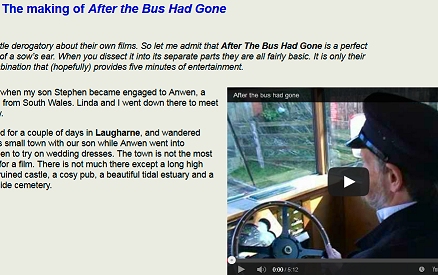
Our picture (right) shows a page on this website with an embedded video. It is in the latest part of Arthur Bullock's series A Video Maker's Journey which includes many video clips. Take a look ...

Screenshot of a web page with a video embedded in it.

How is it done?

Embedding

Upload the video to a specialised video host like YouTube. Once there you are given some code for "embedding". Copy that and paste it into a web page. Voila ! It works like an oblong hole in the page, through which people see the video ... though it is actually running on YouTube or another video host. Social networking sites like Facebook and MySpace have built-in linking systems for such videos.

Copyright

You must have the necessary rights for the music and any footage you did not take yourself.

All major video hosts use automatic music recognition software. That checks your video and flags up any apparent use of copyright music. Some sites issue a warning, most remove your video immediately. YouTube removes the sound and offers you a chance to choose from its own library of alternative free music tracks.

YouTube has an agreement with the main UK music companies and rights holders, which means fewer problems if you upload films with copyright music. If there is a query, quoting your IAC copyright licence details is usually enough to resolve it and get the video back online.
(Details of the IAC copyright licence scheme: here.)

Video Hosts

There are scores of websites which will host your video, most of them free. Some have optional subcription deals which let you upload more or get better quality. Those most commonly used by British film makers are:

YouTube films up to 15 minutes* / files less than 2Gb No other service offered for non-commercial users.
Vimeo file size up to ½Gb a week "Vimeo Plus" offers 5Gb a week for $60  (about £40) a year.
DailyMotion films up to 20 minutes / files less than 2Gb "MotionMaker" - is free, allows unlimited length, but each movie is subject to approval by their staff.
MotionBox up to 300Mb per video "Premium" service offers virtually unlimited file size $50 (about £33) a year.
RealinTime up to 200Mb per video Private viewing "vault" for £15.99 a year.

* actually 15 minutes 59 seconds
the lower the image quality you send them the longer the film can be.

Uploading

Most video hosts accept a variety of file types.  Internet connections bring files to you (downloading) much faster than sending them out from you (uploading). It can take several hours to send a movie up to a video host. Exact times depend on how fast your internet connection is and how busy the web happens to be. 10 hours for a 2Gb, 9 minute film is not unusual. but you only have to do it once.

Each video host lists its preferred file formats and those change frequently as their behind-the-scenes processing changes. Many sites - including YouTube - accept HD but may require special settings to be used. Check their upload instructions and FAQs. (Frequently Asked Questions).

The 2Gb file size limit for YouTube and DailyMotion means you probably do not need to convert your films into another format - for up to 8 minutes 59 seconds of SD video just upload the AVI file.
(Many sites also accept VOB files from a DVD ... even if they do not say so.) The upload time may be several hours so an overnight session is recommended. You might like to stop your anti-virus program updating itself while you are uploading in case that interrupts the load.

For films over 8m 59s on YouTube and DailyMotion; and for most films on other video hosts you may have to use a converter to reduce the picture size, the quality of sound and picture in order to get your film into the file size they accept.


Converting Videos for the Web

All web hosts process all movies - shrinking them and making them into small Flash format files. Send them the best quality you can as close as you can to their maximum file size - which often means doing some conversion work.

For example DailyMotion says that for standard definition movies its preferences are:

Video

  1. Codecs (in descending order of preference):

    H.264, DivX, WMV9, progressive MPEG-2
  2. Aspect: 640x480 (4:3) or 720x480 (16:9)
  3. Bitrate: 1.2 to 3 Mbps (depends on the codec and the resolution)
  4. Framerate: 25 fps (preferred)
  5. 2-pass encoding, progressive (not interlaced, this is very important)
  6. Square pixels

Audio

  1. Codecs (in descending order of preference):

    AAC, MP3, WMA9, MPEG Layer 2
  2. Bitrate: 256 Kbps AAC or 320 Kbps stereo MP3 (ideal)

    128 Kbps stereo AAC or 192 Kbps stereo MP3 (minimum); 44100Hz

Container (file format)

  1. MP4, AVI, MOV
Don't worry about the technical jargon, but for the curious ...

A codec is a computer program which compresses a file before sending it across the web. It is important that the same codec is applied at the other end of the connection to decompress it.

Bitrate describes how many "bits" of computer data are allocated to carry the information about each second of video or audio. The higher the number the better the quality ... but also the larger the file.

2-pass encoding means the converter reads the video file once to note which parts have a lot of image changes (e.g. car chase) and which are relatively unchanging (e.g. talking head). It then reads the video a second time and allots a higher bitrate to the action-filled scenes and a lower one to the "static" scenes. This makes most efficient use of the file size and gives better quality results.

interlaced refers to pictures like those on a traditional television set where first all the odd-numbered lines (1, 3, 5 ...) are shown in a 50th of a second, then all the even-numbered lines (2, 4, 6 ...) in the next 50th of a second. In the early days of television broadcasting this system created less visible flickering than showing a complete picture every 25th of a second. Dailymotion prefers whole pictures each time.

square pixel - a pixel (picture cell) is the basic building block of an image on a computer or tv screen. They may be square or oblong. Generally computer systems prefer square ones for easier handling.

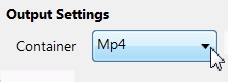
Container refers to the file format in which the data is carried.

How do you actually convert a movie?

A: Use Your Editing Package

Many computer editing programs have output options which do this for you. It is possible to use Windows Movie Maker and Apple iMovie which are free and may already be on your computer for this purpose.

Note: Be careful about standard output settings marked "web". Standards change rapidly. What was appropriate when your editor was written a few years ago is probably out-of-date now. Until recently "web" settings were intended to create tiny, poor quality movies whose only advantage was they were small enough to watch on a dial-up internet connection. Look at the more advanced/custom/"cable" options offered. 

B: or Use a Specialised Program

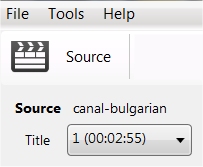
You can do the preparation with a separate computer program. Canopus ProCoder will do a great job, but it costs a lot. Super© is a free compressor and here is our step-by-step guide to using it ...

Audience silhouette. Audience silhouette.
Page updated on 20 January 2011       find us on facebook Join us on Facebook       UNICA information UNICA member
Company Limited by Guarantee No. 00269085. Registered Charity No. 260467. Authors' views are not necessarily those of the Institute of Amateur Cinematographers. Website hosted by Merula. JavaScripts by JavaScript Source. Menu by Live Web Institute. Art work by Miss Jo Black.